> ## Documentation Index
> Fetch the complete documentation index at: https://docs-relytone.data.cloud/llms.txt
> Use this file to discover all available pages before exploring further.
# Graph Analytics (AGE)
Relyt ONE integrates Apache AGE as a built-in extension, supporting efficient graph data queries and operations using the [Cypher](https://neo4j.com/docs/cypher-manual/current/) query language.
## Prerequisites
Before you begin, ensure you have:
* Created a Relyt ONE instance
* Connected to the database
For details on instance creation, user management, and connection methods, refer to the relevant documentation.
## Overview
This guide covers:
1. **Creating and Using Graphs** - Basic AGE usage
2. **Bulk Data Import** - Importing existing table data into graphs
## Example: Product Catalog Graph
Let's model a basic product catalog using AGE. We'll create a catalog containing collections (e.g., Spring/Summer and Fall/Winter), with each collection containing items. Items can have sub-items, and each item has its own properties, images, and attachments.
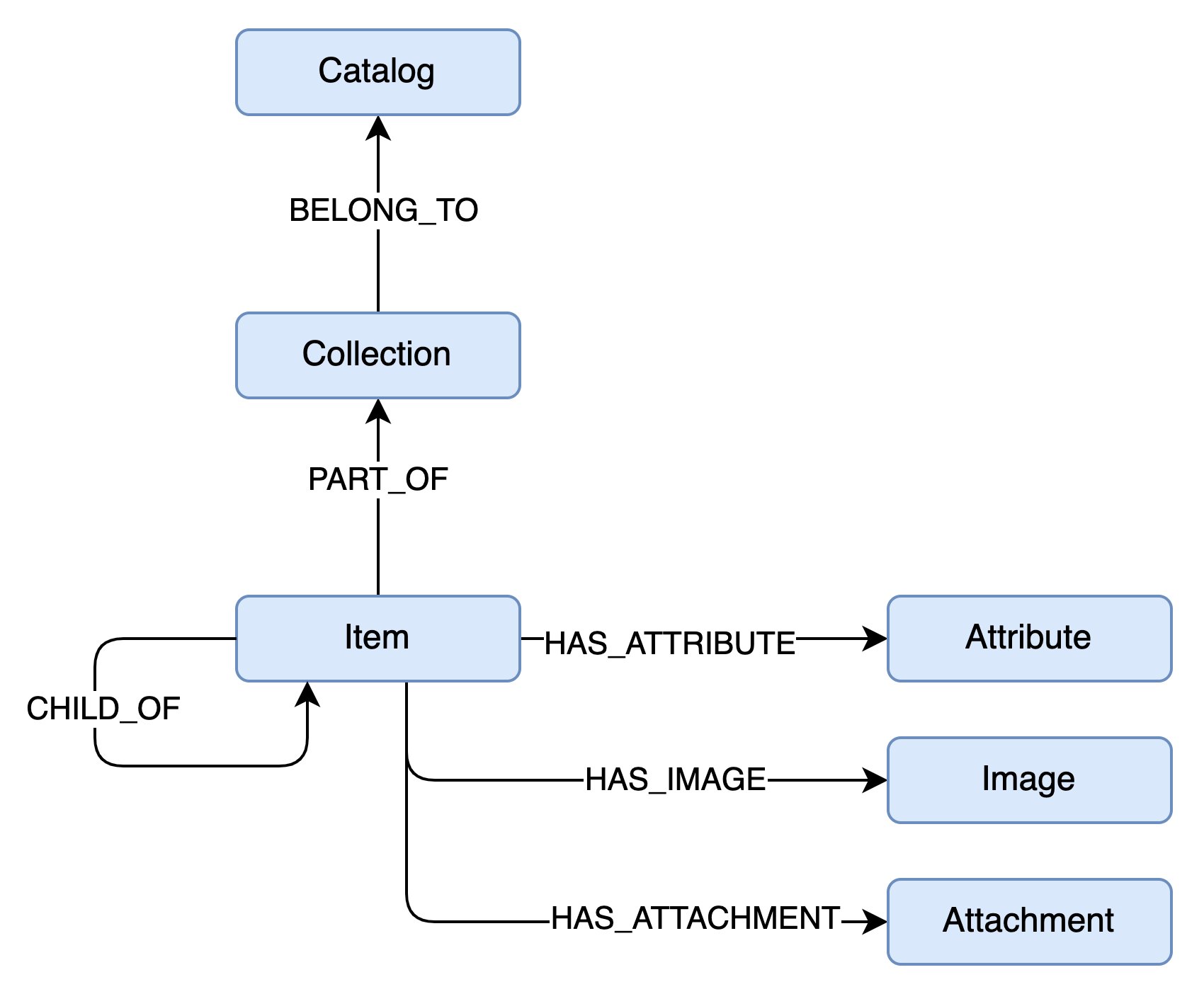 In this model:
* Each entity (blue rectangle) converts to a **Vertex** (node)
* Each relationship converts to an **Edge**
**Naming Conventions:**
* Node labels: PascalCase (e.g., `Catalog`)
* Relationships: UPPER\_SNAKE\_CASE (e.g., `HAS_ATTRIBUTE`)
## Setup
### Set Search Path
Add `ag_catalog` to your search path to simplify queries:
```sql theme={null}
SET search_path TO public, ag_catalog;
```
### Create a Graph
```sql theme={null}
SELECT create_graph('playground');
```
## Creating Graph Structure
You have two approaches:
1. **Dynamic Creation**: Insert vertices and edges directly; the engine auto-creates definitions
2. **Pre-defined Structure**: Create all vertex and edge definitions before inserting data
The first approach is faster but requires caution: you cannot query entities that don't exist yet. The graph engine converts each vertex and edge to database tables. Querying a non-existent label will return an error.
For production use with a known structure, pre-define all vertices and edges before inserting data.
### Create Vertex and Edge Labels
```sql theme={null}
-- Create vertex labels
select create_vlabel(GRAPH_NAME, LABEL);
-- Create edge labels
select create_elabel(GRAPH_NAME, LABEL);
```
For our example graph:
```sql theme={null}
-- Vertices
select create_vlabel('playground', 'Catalog');
select create_vlabel('playground', 'Collection');
select create_vlabel('playground', 'Item');
select create_vlabel('playground', 'Attribute');
select create_vlabel('playground', 'Image');
select create_vlabel('playground', 'Attachment');
-- Edges
select create_elabel('playground', 'BELONGS_TO');
select create_elabel('playground', 'PART_OF');
select create_elabel('playground', 'CHILD_OF');
select create_elabel('playground', 'HAS_ATTRIBUTE');
select create_elabel('playground', 'HAS_IMAGE');
select create_elabel('playground', 'HAS_ATTACHMENT');
```
Edge labels don't specify which vertices they connect. Actual connections are determined by the data.
## Writing Data
### Create a Catalog Node
```sql theme={null}
select * from cypher('playground', $$
CREATE (c:Catalog { code: "C001" })
SET c.name = "Apparel Catalog"
RETURN c
$$) as (catalog agtype);
```
This creates a node with:
* Label: `Catalog`
* Property: `code = "C001"`
* Additional property: `name = "Apparel Catalog"`
### Using MERGE (UPSERT)
AGE doesn't support custom indexes. Running the same `CREATE` query twice creates duplicate nodes.
Use `MERGE` for upsert behavior:
```sql theme={null}
select * from cypher('playground', $$
MERGE (c:Catalog { code: "C001" })
RETURN c
$$) as (catalog agtype);
```
This finds or creates a Catalog with `code = "C001"`.
With MERGE, you cannot use SET in the same statement. Split into two commands:
```sql theme={null}
-- 1. Create/find node with key property
select * from cypher('playground', $$
MERGE (c:Catalog { code: "C001" })
RETURN c
$$) as (catalog agtype);
-- 2. Set additional properties
select * from cypher('playground', $$
MATCH (c:Catalog { code: "C001" })
SET c.name = "Apparel Catalog"
RETURN c
$$) as (catalog agtype);
```
Only include key properties in MERGE to avoid duplicates. Use MATCH + SET for additional properties.
### Add a Collection
Create a Collection and connect it to the Catalog:
```sql theme={null}
select * from cypher('playground', $$
MATCH (c:Catalog { code: "C001"} )
MERGE (co:Collection { code: "SS22" })
MERGE (co)-[:BELONGS_TO]->(c)
RETURN co
$$) as (collection agtype);
```
Notice the visual representation: `(co)-[:BELONGS_TO]->(c)` clearly shows a directed relationship.
### Add Items
Add multiple items to the SS22 collection:
```sql theme={null}
select * from cypher('playground', $$
MATCH (co:Collection { code: "SS22" })
MERGE (i1:Item { code: 'ISS001'})
MERGE (i1)-[:PART_OF]->(co)
MERGE (i2:Item { code: 'ISS002'})
MERGE (i2)-[:PART_OF]->(co)
MERGE (i3:Item { code: 'ISS003'})
MERGE (i3)-[:PART_OF]->(co)
RETURN [i1, i2, i3]
$$) as (items agtype);
```
### Update Items with Attributes
Add attributes as connected nodes:
```sql theme={null}
select * from cypher('playground', $$
MATCH (i:Item)
WHERE i.code = "ISS001"
SET i.name = "T-Shirt"
MERGE (i)-[:HAS_ATTRIBUTE { value: "S"}]->(:Attribute { name: "size" })
RETURN i
$$) as (item agtype);
```
Add another attribute:
```sql theme={null}
select * from cypher('playground', $$
MERGE (i:Item { code: "ISS001"})-[:HAS_ATTRIBUTE { value: "Blue"}]->(:Attribute { name: "color" })
RETURN i
$$) as (item agtype);
```
Edges can have properties, making them first-class citizens in the graph.
## Querying Graphs
### Pattern Matching
Retrieve all items in catalog C001:
```sql theme={null}
select * from cypher('playground', $$
MATCH (c:Catalog { code: "C001" })<-[:BELONGS_TO]-(co:Collection)<-[:PART_OF]-(i:Item)
RETURN i
$$) as (item agtype);
```
### Variable-Length Paths
A more compact and powerful representation:
```sql theme={null}
select * from cypher('playground', $$
MATCH (c:Catalog { code: "C001" })-[*]-(i:Item)
RETURN i
$$) as (item agtype);
```
This returns all items connected to catalog C001 through any relationship path.
Use unconstrained path matching carefully. On large graphs, complexity can explode, impacting performance.
### Retrieve Specific Properties
Get attributes for item ISS001:
```sql theme={null}
select * from cypher('playground', $$
MATCH (:Item { code: 'ISS001'})-[v:HAS_ATTRIBUTE]->(a:Attribute)
RETURN a.name, v.value
$$) as (name agtype, value agtype);
```
### Custom Return Values
Return a JSON object list:
```sql theme={null}
select * from cypher('playground', $$
MATCH (:Item { code: 'ISS001'})-[v:HAS_ATTRIBUTE]->(a:Attribute)
RETURN {
name: a.name,
value: v.value
}
$$) as (attr agtype);
```
## Deleting Data
### Remove Labels
```sql theme={null}
-- Add a label
SELECT * FROM cypher('playground', $$
MATCH (i1:Item { code: 'ISS001'})
SET i1.newlabel = 'to deleted'
RETURN i1
$$) AS (result_a agtype);
-- Remove the label
SELECT * FROM cypher('playground', $$
MATCH (i1:Item { code: 'ISS001'})
REMOVE i1.newlabel
RETURN i1
$$) AS (result_a agtype);
```
### Delete Edges
```sql theme={null}
-- Delete the size attribute edge for T-Shirt
SELECT * FROM cypher('playground', $$
MATCH (i1:Item)-[r:HAS_ATTRIBUTE]->(a1:Attribute)
WHERE i1.name = 'T-Shirt' AND a1.name='size'
DELETE r
$$) AS (result_a agtype);
```
### Delete Vertices
```sql theme={null}
-- Delete all size attributes
SELECT * FROM cypher('playground', $$
MATCH(a1:Attribute { name: 'size'})
DELETE a1
$$) AS (result_a agtype);
```
### Delete Vertices with Edges
Deleting a vertex with edges will fail:
```sql theme={null}
SELECT * FROM cypher('playground', $$
MATCH(a1:Attribute { name: 'color'})
DELETE a1
$$) AS (result_a agtype);
```
This will produce an error:
```
ERROR: Cannot delete a vertex that has edge(s). Delete the edge(s) first, or try DETACH DELETE.
```
Use `DETACH DELETE` to remove both vertex and edges:
```sql theme={null}
SELECT * FROM cypher('playground', $$
MATCH(a1:Attribute { name: 'color'})
DETACH DELETE a1
$$) AS (result_a agtype);
```
### Drop a Graph
```sql theme={null}
SELECT drop_graph('playground');
```
If the graph contains data, you'll get an error. Use cascade to force deletion:
```sql theme={null}
SELECT drop_graph('playground', true);
```
## Bulk Data Import
For large datasets, inserting data one by one is inefficient. Instead, import data into relational tables first, then load into the graph.
### Step 1: Create and Populate Tables
**Catalog Table:**
```sql theme={null}
CREATE TABLE IF NOT EXISTS catalog_raw (
id BIGINT,
code TEXT,
name TEXT,
description TEXT
);
INSERT INTO catalog_raw VALUES
('0', 'C001', 'Apparel Catalog', 'Fashion and clothing catalog'),
('1', 'C002', 'Electronics Catalog', 'Electronic devices and accessories');
```
**Collection Table:**
```sql theme={null}
CREATE TABLE IF NOT EXISTS collection_raw (
id BIGINT,
code TEXT,
name TEXT,
season TEXT
);
INSERT INTO collection_raw VALUES
('10', 'SS22', 'Spring Summer 2022', 'Spring'),
('11', 'FW22', 'Fall Winter 2022', 'Fall'),
('12', 'SS23', 'Spring Summer 2023', 'Spring');
```
**Item Table:**
```sql theme={null}
CREATE TABLE IF NOT EXISTS item_raw (
id BIGINT,
code TEXT,
name TEXT,
price DECIMAL
);
INSERT INTO item_raw VALUES
('100', 'ISS001', 'T-Shirt', 29.99),
('101', 'ISS002', 'Jeans', 79.99),
('102', 'ISS003', 'Sneakers', 129.99),
('103', 'IWS001', 'Winter Coat', 199.99),
('104', 'IWS002', 'Boots', 149.99);
```
**Relationship Tables:**
```sql theme={null}
-- BELONGS_TO relationships
CREATE TABLE IF NOT EXISTS collection_belongsto_catalog_raw (
start_id BIGINT,
end_id BIGINT
);
INSERT INTO collection_belongsto_catalog_raw VALUES
('10','0'), ('11','0'), ('12','0');
-- PART_OF relationships
CREATE TABLE IF NOT EXISTS item_partof_collection_raw (
start_id BIGINT,
end_id BIGINT
);
INSERT INTO item_partof_collection_raw VALUES
('100','10'), ('101','10'), ('102','10'), ('103','11'), ('104','11');
```
### Step 2: Create Helper Functions
```sql theme={null}
CREATE OR REPLACE FUNCTION age_name_to_idx_start(graph_name text, kind_name text, label_name text)
RETURNS bigint
AS 'SELECT id::bigint<<48 FROM ag_catalog.ag_label WHERE kind = kind_name AND name = label_name AND graph = (SELECT graphid FROM ag_catalog.ag_graph WHERE name = graph_name)'
LANGUAGE SQL IMMUTABLE STRICT PARALLEL SAFE;
CREATE OR REPLACE FUNCTION age_name_to_seq(graph_name text, kind_name text, label_name text)
RETURNS text
AS $$SELECT graph_name || '."' || seq_name || '"' FROM ag_catalog.ag_label WHERE kind = kind_name and name = label_name and graph = (SELECT graphid FROM ag_catalog.ag_graph WHERE name = graph_name)$$
LANGUAGE SQL IMMUTABLE STRICT PARALLEL SAFE;
```
### Step 3: Create Graph and Labels
```sql theme={null}
SELECT ag_catalog.create_graph('playground');
-- Create vertex labels
SELECT ag_catalog.create_vlabel('playground', 'Catalog');
SELECT ag_catalog.create_vlabel('playground', 'Collection');
SELECT ag_catalog.create_vlabel('playground', 'Item');
-- Create edge labels
SELECT ag_catalog.create_elabel('playground', 'BELONGS_TO');
SELECT ag_catalog.create_elabel('playground', 'PART_OF');
```
### Step 4: Import Vertex Data
```sql theme={null}
-- Import Catalog data
INSERT INTO playground."Catalog"
SELECT
(age_name_to_idx_start('playground', 'v', 'Catalog') + id)::text::ag_catalog.graphid,
row_to_json((SELECT x FROM (SELECT code, name, description) x))::text::ag_catalog.agtype
FROM catalog_raw;
-- Set sequence value
SELECT setval(age_name_to_seq('playground', 'v', 'Catalog'), (SELECT max(id) + 1 FROM catalog_raw));
-- Import Collection data
INSERT INTO playground."Collection"
SELECT
(age_name_to_idx_start('playground', 'v', 'Collection') + id)::text::ag_catalog.graphid,
row_to_json((SELECT x FROM (SELECT code, name, season) x))::text::ag_catalog.agtype
FROM collection_raw;
SELECT setval(age_name_to_seq('playground', 'v', 'Collection'), (SELECT max(id) + 1 FROM collection_raw));
-- Import Item data
INSERT INTO playground."Item"
SELECT
(age_name_to_idx_start('playground', 'v', 'Item') + id)::text::ag_catalog.graphid,
row_to_json((SELECT x FROM (SELECT code, name, price) x))::text::ag_catalog.agtype
FROM item_raw;
SELECT setval(age_name_to_seq('playground', 'v', 'Item'), (SELECT max(id) + 1 FROM item_raw));
```
### Step 5: Import Edge Data
```sql theme={null}
-- Import BELONGS_TO edges
INSERT INTO playground."BELONGS_TO"(start_id, end_id, properties)
SELECT
(age_name_to_idx_start('playground', 'v', 'Collection') + start_id)::text::ag_catalog.graphid,
(age_name_to_idx_start('playground', 'v', 'Catalog') + end_id)::text::ag_catalog.graphid,
'{}'::text::ag_catalog.agtype
FROM collection_belongsto_catalog_raw;
-- Import PART_OF edges
INSERT INTO playground."PART_OF"(start_id, end_id, properties)
SELECT
(age_name_to_idx_start('playground', 'v', 'Item') + start_id)::text::ag_catalog.graphid,
(age_name_to_idx_start('playground', 'v', 'Collection') + end_id)::text::ag_catalog.graphid,
'{}'::text::ag_catalog.agtype
FROM item_partof_collection_raw;
```
### Step 6: Verify Data
```sql theme={null}
SELECT * FROM ag_catalog.cypher('playground', $$
MATCH (c:Catalog)<-[:BELONGS_TO]-(co:Collection)<-[:PART_OF]-(i:Item)
RETURN c, co, i
LIMIT 5
$$) AS (catalog ag_catalog.agtype, collection ag_catalog.agtype, item ag_catalog.agtype);
```
## Next Steps
This guide covers the basics of using Apache AGE with Relyt ONE. For in-depth Cypher concepts and detailed query syntax, visit the official [Cypher Query Language documentation](https://neo4j.com/docs/cypher-manual/current/).
You can also explore:
* Advanced Cypher patterns and techniques
* Graph algorithms and analytics
* Performance optimization strategies
* Building production graph applications
In this model:
* Each entity (blue rectangle) converts to a **Vertex** (node)
* Each relationship converts to an **Edge**
**Naming Conventions:**
* Node labels: PascalCase (e.g., `Catalog`)
* Relationships: UPPER\_SNAKE\_CASE (e.g., `HAS_ATTRIBUTE`)
## Setup
### Set Search Path
Add `ag_catalog` to your search path to simplify queries:
```sql theme={null}
SET search_path TO public, ag_catalog;
```
### Create a Graph
```sql theme={null}
SELECT create_graph('playground');
```
## Creating Graph Structure
You have two approaches:
1. **Dynamic Creation**: Insert vertices and edges directly; the engine auto-creates definitions
2. **Pre-defined Structure**: Create all vertex and edge definitions before inserting data
The first approach is faster but requires caution: you cannot query entities that don't exist yet. The graph engine converts each vertex and edge to database tables. Querying a non-existent label will return an error.
For production use with a known structure, pre-define all vertices and edges before inserting data.
### Create Vertex and Edge Labels
```sql theme={null}
-- Create vertex labels
select create_vlabel(GRAPH_NAME, LABEL);
-- Create edge labels
select create_elabel(GRAPH_NAME, LABEL);
```
For our example graph:
```sql theme={null}
-- Vertices
select create_vlabel('playground', 'Catalog');
select create_vlabel('playground', 'Collection');
select create_vlabel('playground', 'Item');
select create_vlabel('playground', 'Attribute');
select create_vlabel('playground', 'Image');
select create_vlabel('playground', 'Attachment');
-- Edges
select create_elabel('playground', 'BELONGS_TO');
select create_elabel('playground', 'PART_OF');
select create_elabel('playground', 'CHILD_OF');
select create_elabel('playground', 'HAS_ATTRIBUTE');
select create_elabel('playground', 'HAS_IMAGE');
select create_elabel('playground', 'HAS_ATTACHMENT');
```
Edge labels don't specify which vertices they connect. Actual connections are determined by the data.
## Writing Data
### Create a Catalog Node
```sql theme={null}
select * from cypher('playground', $$
CREATE (c:Catalog { code: "C001" })
SET c.name = "Apparel Catalog"
RETURN c
$$) as (catalog agtype);
```
This creates a node with:
* Label: `Catalog`
* Property: `code = "C001"`
* Additional property: `name = "Apparel Catalog"`
### Using MERGE (UPSERT)
AGE doesn't support custom indexes. Running the same `CREATE` query twice creates duplicate nodes.
Use `MERGE` for upsert behavior:
```sql theme={null}
select * from cypher('playground', $$
MERGE (c:Catalog { code: "C001" })
RETURN c
$$) as (catalog agtype);
```
This finds or creates a Catalog with `code = "C001"`.
With MERGE, you cannot use SET in the same statement. Split into two commands:
```sql theme={null}
-- 1. Create/find node with key property
select * from cypher('playground', $$
MERGE (c:Catalog { code: "C001" })
RETURN c
$$) as (catalog agtype);
-- 2. Set additional properties
select * from cypher('playground', $$
MATCH (c:Catalog { code: "C001" })
SET c.name = "Apparel Catalog"
RETURN c
$$) as (catalog agtype);
```
Only include key properties in MERGE to avoid duplicates. Use MATCH + SET for additional properties.
### Add a Collection
Create a Collection and connect it to the Catalog:
```sql theme={null}
select * from cypher('playground', $$
MATCH (c:Catalog { code: "C001"} )
MERGE (co:Collection { code: "SS22" })
MERGE (co)-[:BELONGS_TO]->(c)
RETURN co
$$) as (collection agtype);
```
Notice the visual representation: `(co)-[:BELONGS_TO]->(c)` clearly shows a directed relationship.
### Add Items
Add multiple items to the SS22 collection:
```sql theme={null}
select * from cypher('playground', $$
MATCH (co:Collection { code: "SS22" })
MERGE (i1:Item { code: 'ISS001'})
MERGE (i1)-[:PART_OF]->(co)
MERGE (i2:Item { code: 'ISS002'})
MERGE (i2)-[:PART_OF]->(co)
MERGE (i3:Item { code: 'ISS003'})
MERGE (i3)-[:PART_OF]->(co)
RETURN [i1, i2, i3]
$$) as (items agtype);
```
### Update Items with Attributes
Add attributes as connected nodes:
```sql theme={null}
select * from cypher('playground', $$
MATCH (i:Item)
WHERE i.code = "ISS001"
SET i.name = "T-Shirt"
MERGE (i)-[:HAS_ATTRIBUTE { value: "S"}]->(:Attribute { name: "size" })
RETURN i
$$) as (item agtype);
```
Add another attribute:
```sql theme={null}
select * from cypher('playground', $$
MERGE (i:Item { code: "ISS001"})-[:HAS_ATTRIBUTE { value: "Blue"}]->(:Attribute { name: "color" })
RETURN i
$$) as (item agtype);
```
Edges can have properties, making them first-class citizens in the graph.
## Querying Graphs
### Pattern Matching
Retrieve all items in catalog C001:
```sql theme={null}
select * from cypher('playground', $$
MATCH (c:Catalog { code: "C001" })<-[:BELONGS_TO]-(co:Collection)<-[:PART_OF]-(i:Item)
RETURN i
$$) as (item agtype);
```
### Variable-Length Paths
A more compact and powerful representation:
```sql theme={null}
select * from cypher('playground', $$
MATCH (c:Catalog { code: "C001" })-[*]-(i:Item)
RETURN i
$$) as (item agtype);
```
This returns all items connected to catalog C001 through any relationship path.
Use unconstrained path matching carefully. On large graphs, complexity can explode, impacting performance.
### Retrieve Specific Properties
Get attributes for item ISS001:
```sql theme={null}
select * from cypher('playground', $$
MATCH (:Item { code: 'ISS001'})-[v:HAS_ATTRIBUTE]->(a:Attribute)
RETURN a.name, v.value
$$) as (name agtype, value agtype);
```
### Custom Return Values
Return a JSON object list:
```sql theme={null}
select * from cypher('playground', $$
MATCH (:Item { code: 'ISS001'})-[v:HAS_ATTRIBUTE]->(a:Attribute)
RETURN {
name: a.name,
value: v.value
}
$$) as (attr agtype);
```
## Deleting Data
### Remove Labels
```sql theme={null}
-- Add a label
SELECT * FROM cypher('playground', $$
MATCH (i1:Item { code: 'ISS001'})
SET i1.newlabel = 'to deleted'
RETURN i1
$$) AS (result_a agtype);
-- Remove the label
SELECT * FROM cypher('playground', $$
MATCH (i1:Item { code: 'ISS001'})
REMOVE i1.newlabel
RETURN i1
$$) AS (result_a agtype);
```
### Delete Edges
```sql theme={null}
-- Delete the size attribute edge for T-Shirt
SELECT * FROM cypher('playground', $$
MATCH (i1:Item)-[r:HAS_ATTRIBUTE]->(a1:Attribute)
WHERE i1.name = 'T-Shirt' AND a1.name='size'
DELETE r
$$) AS (result_a agtype);
```
### Delete Vertices
```sql theme={null}
-- Delete all size attributes
SELECT * FROM cypher('playground', $$
MATCH(a1:Attribute { name: 'size'})
DELETE a1
$$) AS (result_a agtype);
```
### Delete Vertices with Edges
Deleting a vertex with edges will fail:
```sql theme={null}
SELECT * FROM cypher('playground', $$
MATCH(a1:Attribute { name: 'color'})
DELETE a1
$$) AS (result_a agtype);
```
This will produce an error:
```
ERROR: Cannot delete a vertex that has edge(s). Delete the edge(s) first, or try DETACH DELETE.
```
Use `DETACH DELETE` to remove both vertex and edges:
```sql theme={null}
SELECT * FROM cypher('playground', $$
MATCH(a1:Attribute { name: 'color'})
DETACH DELETE a1
$$) AS (result_a agtype);
```
### Drop a Graph
```sql theme={null}
SELECT drop_graph('playground');
```
If the graph contains data, you'll get an error. Use cascade to force deletion:
```sql theme={null}
SELECT drop_graph('playground', true);
```
## Bulk Data Import
For large datasets, inserting data one by one is inefficient. Instead, import data into relational tables first, then load into the graph.
### Step 1: Create and Populate Tables
**Catalog Table:**
```sql theme={null}
CREATE TABLE IF NOT EXISTS catalog_raw (
id BIGINT,
code TEXT,
name TEXT,
description TEXT
);
INSERT INTO catalog_raw VALUES
('0', 'C001', 'Apparel Catalog', 'Fashion and clothing catalog'),
('1', 'C002', 'Electronics Catalog', 'Electronic devices and accessories');
```
**Collection Table:**
```sql theme={null}
CREATE TABLE IF NOT EXISTS collection_raw (
id BIGINT,
code TEXT,
name TEXT,
season TEXT
);
INSERT INTO collection_raw VALUES
('10', 'SS22', 'Spring Summer 2022', 'Spring'),
('11', 'FW22', 'Fall Winter 2022', 'Fall'),
('12', 'SS23', 'Spring Summer 2023', 'Spring');
```
**Item Table:**
```sql theme={null}
CREATE TABLE IF NOT EXISTS item_raw (
id BIGINT,
code TEXT,
name TEXT,
price DECIMAL
);
INSERT INTO item_raw VALUES
('100', 'ISS001', 'T-Shirt', 29.99),
('101', 'ISS002', 'Jeans', 79.99),
('102', 'ISS003', 'Sneakers', 129.99),
('103', 'IWS001', 'Winter Coat', 199.99),
('104', 'IWS002', 'Boots', 149.99);
```
**Relationship Tables:**
```sql theme={null}
-- BELONGS_TO relationships
CREATE TABLE IF NOT EXISTS collection_belongsto_catalog_raw (
start_id BIGINT,
end_id BIGINT
);
INSERT INTO collection_belongsto_catalog_raw VALUES
('10','0'), ('11','0'), ('12','0');
-- PART_OF relationships
CREATE TABLE IF NOT EXISTS item_partof_collection_raw (
start_id BIGINT,
end_id BIGINT
);
INSERT INTO item_partof_collection_raw VALUES
('100','10'), ('101','10'), ('102','10'), ('103','11'), ('104','11');
```
### Step 2: Create Helper Functions
```sql theme={null}
CREATE OR REPLACE FUNCTION age_name_to_idx_start(graph_name text, kind_name text, label_name text)
RETURNS bigint
AS 'SELECT id::bigint<<48 FROM ag_catalog.ag_label WHERE kind = kind_name AND name = label_name AND graph = (SELECT graphid FROM ag_catalog.ag_graph WHERE name = graph_name)'
LANGUAGE SQL IMMUTABLE STRICT PARALLEL SAFE;
CREATE OR REPLACE FUNCTION age_name_to_seq(graph_name text, kind_name text, label_name text)
RETURNS text
AS $$SELECT graph_name || '."' || seq_name || '"' FROM ag_catalog.ag_label WHERE kind = kind_name and name = label_name and graph = (SELECT graphid FROM ag_catalog.ag_graph WHERE name = graph_name)$$
LANGUAGE SQL IMMUTABLE STRICT PARALLEL SAFE;
```
### Step 3: Create Graph and Labels
```sql theme={null}
SELECT ag_catalog.create_graph('playground');
-- Create vertex labels
SELECT ag_catalog.create_vlabel('playground', 'Catalog');
SELECT ag_catalog.create_vlabel('playground', 'Collection');
SELECT ag_catalog.create_vlabel('playground', 'Item');
-- Create edge labels
SELECT ag_catalog.create_elabel('playground', 'BELONGS_TO');
SELECT ag_catalog.create_elabel('playground', 'PART_OF');
```
### Step 4: Import Vertex Data
```sql theme={null}
-- Import Catalog data
INSERT INTO playground."Catalog"
SELECT
(age_name_to_idx_start('playground', 'v', 'Catalog') + id)::text::ag_catalog.graphid,
row_to_json((SELECT x FROM (SELECT code, name, description) x))::text::ag_catalog.agtype
FROM catalog_raw;
-- Set sequence value
SELECT setval(age_name_to_seq('playground', 'v', 'Catalog'), (SELECT max(id) + 1 FROM catalog_raw));
-- Import Collection data
INSERT INTO playground."Collection"
SELECT
(age_name_to_idx_start('playground', 'v', 'Collection') + id)::text::ag_catalog.graphid,
row_to_json((SELECT x FROM (SELECT code, name, season) x))::text::ag_catalog.agtype
FROM collection_raw;
SELECT setval(age_name_to_seq('playground', 'v', 'Collection'), (SELECT max(id) + 1 FROM collection_raw));
-- Import Item data
INSERT INTO playground."Item"
SELECT
(age_name_to_idx_start('playground', 'v', 'Item') + id)::text::ag_catalog.graphid,
row_to_json((SELECT x FROM (SELECT code, name, price) x))::text::ag_catalog.agtype
FROM item_raw;
SELECT setval(age_name_to_seq('playground', 'v', 'Item'), (SELECT max(id) + 1 FROM item_raw));
```
### Step 5: Import Edge Data
```sql theme={null}
-- Import BELONGS_TO edges
INSERT INTO playground."BELONGS_TO"(start_id, end_id, properties)
SELECT
(age_name_to_idx_start('playground', 'v', 'Collection') + start_id)::text::ag_catalog.graphid,
(age_name_to_idx_start('playground', 'v', 'Catalog') + end_id)::text::ag_catalog.graphid,
'{}'::text::ag_catalog.agtype
FROM collection_belongsto_catalog_raw;
-- Import PART_OF edges
INSERT INTO playground."PART_OF"(start_id, end_id, properties)
SELECT
(age_name_to_idx_start('playground', 'v', 'Item') + start_id)::text::ag_catalog.graphid,
(age_name_to_idx_start('playground', 'v', 'Collection') + end_id)::text::ag_catalog.graphid,
'{}'::text::ag_catalog.agtype
FROM item_partof_collection_raw;
```
### Step 6: Verify Data
```sql theme={null}
SELECT * FROM ag_catalog.cypher('playground', $$
MATCH (c:Catalog)<-[:BELONGS_TO]-(co:Collection)<-[:PART_OF]-(i:Item)
RETURN c, co, i
LIMIT 5
$$) AS (catalog ag_catalog.agtype, collection ag_catalog.agtype, item ag_catalog.agtype);
```
## Next Steps
This guide covers the basics of using Apache AGE with Relyt ONE. For in-depth Cypher concepts and detailed query syntax, visit the official [Cypher Query Language documentation](https://neo4j.com/docs/cypher-manual/current/).
You can also explore:
* Advanced Cypher patterns and techniques
* Graph algorithms and analytics
* Performance optimization strategies
* Building production graph applications