Relyt ONE integrates Apache AGE as a built-in extension, supporting efficient graph data queries and operations using the Cypher query language.

Prerequisites

Before you begin, ensure you have:
  • Created a Relyt ONE instance
  • Connected to the database
For details on instance creation, user management, and connection methods, refer to the relevant documentation.

Overview

This guide covers:
  1. Creating and Using Graphs - Basic AGE usage
  2. Bulk Data Import - Importing existing table data into graphs

Example: Product Catalog Graph

Let’s model a basic product catalog using AGE. We’ll create a catalog containing collections (e.g., Spring/Summer and Fall/Winter), with each collection containing items. Items can have sub-items, and each item has its own properties, images, and attachments. Product Catalog Graph Model In this model:
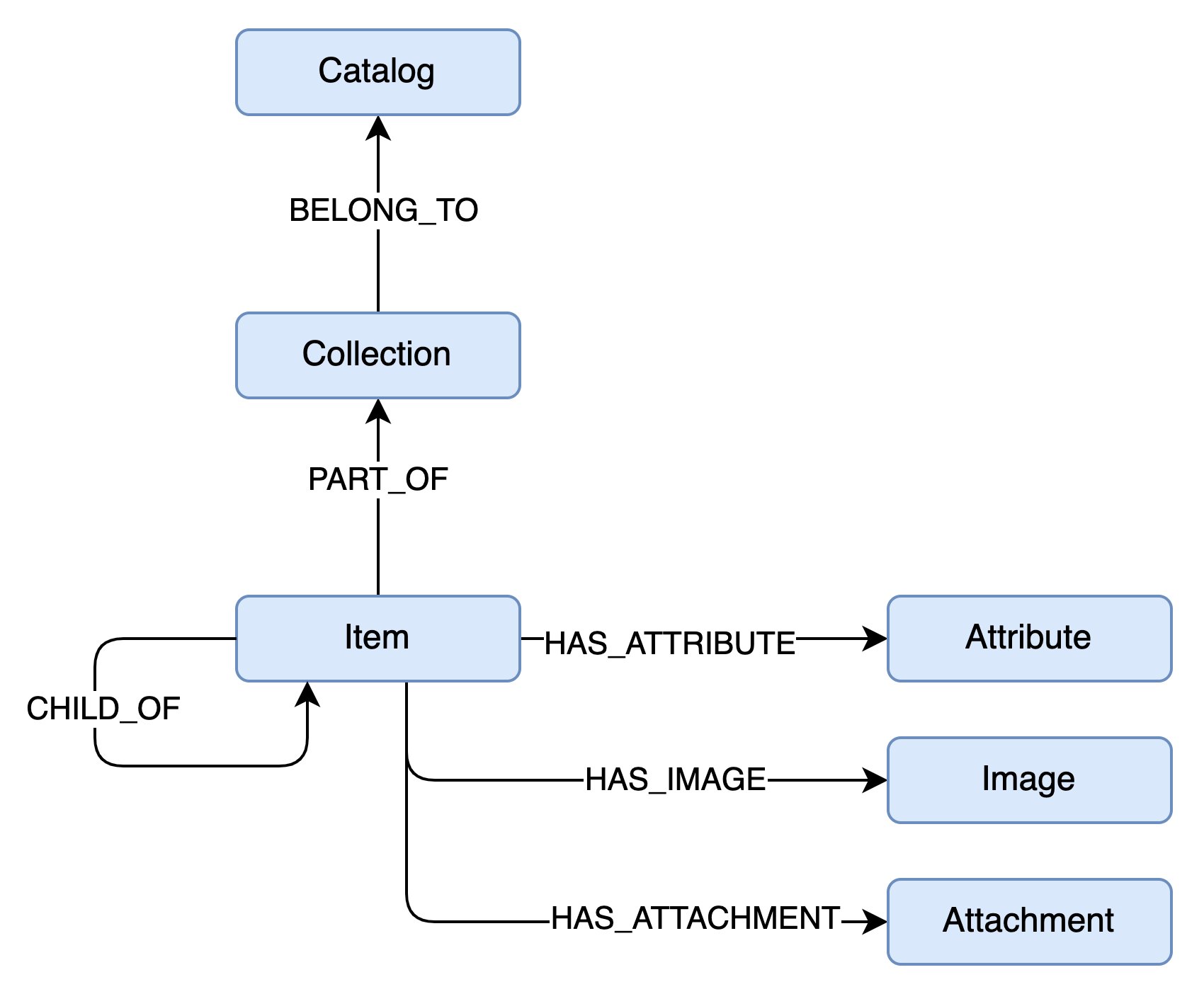
  • Each entity (blue rectangle) converts to a Vertex (node)
  • Each relationship converts to an Edge
Naming Conventions:
  • Node labels: PascalCase (e.g., Catalog)
  • Relationships: UPPER_SNAKE_CASE (e.g., HAS_ATTRIBUTE)

Setup

Set Search Path

Add ag_catalog to your search path to simplify queries:
SET search_path TO public, ag_catalog;

Create a Graph

SELECT create_graph('playground');

Creating Graph Structure

You have two approaches:
  1. Dynamic Creation: Insert vertices and edges directly; the engine auto-creates definitions
  2. Pre-defined Structure: Create all vertex and edge definitions before inserting data
The first approach is faster but requires caution: you cannot query entities that don’t exist yet. The graph engine converts each vertex and edge to database tables. Querying a non-existent label will return an error.
For production use with a known structure, pre-define all vertices and edges before inserting data.

Create Vertex and Edge Labels

-- Create vertex labels
select create_vlabel(GRAPH_NAME, LABEL);

-- Create edge labels
select create_elabel(GRAPH_NAME, LABEL);
For our example graph:
-- Vertices
select create_vlabel('playground', 'Catalog');
select create_vlabel('playground', 'Collection');
select create_vlabel('playground', 'Item');
select create_vlabel('playground', 'Attribute');
select create_vlabel('playground', 'Image');
select create_vlabel('playground', 'Attachment');

-- Edges
select create_elabel('playground', 'BELONGS_TO');
select create_elabel('playground', 'PART_OF');
select create_elabel('playground', 'CHILD_OF');
select create_elabel('playground', 'HAS_ATTRIBUTE');
select create_elabel('playground', 'HAS_IMAGE');
select create_elabel('playground', 'HAS_ATTACHMENT');
Edge labels don’t specify which vertices they connect. Actual connections are determined by the data.

Writing Data

Create a Catalog Node

select * from cypher('playground', $$
    CREATE (c:Catalog { code: "C001" })
    SET c.name = "Apparel Catalog"
    RETURN c
$$) as (catalog agtype);
This creates a node with:
  • Label: Catalog
  • Property: code = "C001"
  • Additional property: name = "Apparel Catalog"

Using MERGE (UPSERT)

AGE doesn’t support custom indexes. Running the same CREATE query twice creates duplicate nodes. Use MERGE for upsert behavior:
select * from cypher('playground', $$
    MERGE (c:Catalog { code: "C001" })
    RETURN c
$$) as (catalog agtype);
This finds or creates a Catalog with code = "C001".
With MERGE, you cannot use SET in the same statement. Split into two commands:
-- 1. Create/find node with key property
select * from cypher('playground', $$
    MERGE (c:Catalog { code: "C001" })
    RETURN c
$$) as (catalog agtype);

-- 2. Set additional properties
select * from cypher('playground', $$
    MATCH (c:Catalog { code: "C001" })
    SET c.name = "Apparel Catalog"
    RETURN c
$$) as (catalog agtype);
Only include key properties in MERGE to avoid duplicates. Use MATCH + SET for additional properties.

Add a Collection

Create a Collection and connect it to the Catalog:
select * from cypher('playground', $$
    MATCH (c:Catalog { code: "C001"} )
    MERGE (co:Collection { code: "SS22" })
    MERGE (co)-[:BELONGS_TO]->(c)
    RETURN co
$$) as (collection agtype);
Notice the visual representation: (co)-[:BELONGS_TO]->(c) clearly shows a directed relationship.

Add Items

Add multiple items to the SS22 collection:
select * from cypher('playground', $$
    MATCH (co:Collection { code: "SS22" })
    MERGE (i1:Item { code: 'ISS001'})
    MERGE (i1)-[:PART_OF]->(co)
    MERGE (i2:Item { code: 'ISS002'})
    MERGE (i2)-[:PART_OF]->(co)
    MERGE (i3:Item { code: 'ISS003'})
    MERGE (i3)-[:PART_OF]->(co)
    RETURN [i1, i2, i3]
$$) as (items agtype);

Update Items with Attributes

Add attributes as connected nodes:
select * from cypher('playground', $$
    MATCH (i:Item)
    WHERE i.code = "ISS001"
    SET i.name = "T-Shirt"
    MERGE (i)-[:HAS_ATTRIBUTE { value: "S"}]->(:Attribute { name: "size" })
    RETURN i
$$) as (item agtype);
Add another attribute:
select * from cypher('playground', $$
    MERGE (i:Item { code: "ISS001"})-[:HAS_ATTRIBUTE { value: "Blue"}]->(:Attribute { name: "color" })
    RETURN i
$$) as (item agtype);
Edges can have properties, making them first-class citizens in the graph.

Querying Graphs

Pattern Matching

Retrieve all items in catalog C001:
select * from cypher('playground', $$
    MATCH (c:Catalog { code: "C001" })<-[:BELONGS_TO]-(co:Collection)<-[:PART_OF]-(i:Item)
    RETURN i
$$) as (item agtype);

Variable-Length Paths

A more compact and powerful representation:
select * from cypher('playground', $$
    MATCH (c:Catalog { code: "C001" })-[*]-(i:Item)
    RETURN i
$$) as (item agtype);
This returns all items connected to catalog C001 through any relationship path.
Use unconstrained path matching carefully. On large graphs, complexity can explode, impacting performance.

Retrieve Specific Properties

Get attributes for item ISS001:
select * from cypher('playground', $$
    MATCH (:Item { code: 'ISS001'})-[v:HAS_ATTRIBUTE]->(a:Attribute)
    RETURN a.name, v.value
$$) as (name agtype, value agtype);

Custom Return Values

Return a JSON object list:
select * from cypher('playground', $$
    MATCH (:Item { code: 'ISS001'})-[v:HAS_ATTRIBUTE]->(a:Attribute)
    RETURN {
        name: a.name,
        value: v.value
    }
$$) as (attr agtype);

Deleting Data

Remove Labels

-- Add a label
SELECT * FROM cypher('playground', $$
  MATCH (i1:Item { code: 'ISS001'})
  SET i1.newlabel = 'to deleted'
  RETURN i1
$$) AS (result_a agtype);

-- Remove the label
SELECT * FROM cypher('playground', $$
  MATCH (i1:Item { code: 'ISS001'})
  REMOVE i1.newlabel
  RETURN i1
$$) AS (result_a agtype);

Delete Edges

-- Delete the size attribute edge for T-Shirt
SELECT * FROM cypher('playground', $$
  MATCH (i1:Item)-[r:HAS_ATTRIBUTE]->(a1:Attribute)
  WHERE i1.name = 'T-Shirt' AND a1.name='size'
  DELETE r
$$) AS (result_a agtype);

Delete Vertices

-- Delete all size attributes
SELECT * FROM cypher('playground', $$
  MATCH(a1:Attribute { name: 'size'})
  DELETE a1
$$) AS (result_a agtype);

Delete Vertices with Edges

Deleting a vertex with edges will fail:
SELECT * FROM cypher('playground', $$
  MATCH(a1:Attribute { name: 'color'})
  DELETE a1
$$) AS (result_a agtype);
This will produce an error:
ERROR: Cannot delete a vertex that has edge(s). Delete the edge(s) first, or try DETACH DELETE.
Use DETACH DELETE to remove both vertex and edges:
SELECT * FROM cypher('playground', $$
  MATCH(a1:Attribute { name: 'color'})
  DETACH DELETE a1
$$) AS (result_a agtype);

Drop a Graph

SELECT drop_graph('playground');
If the graph contains data, you’ll get an error. Use cascade to force deletion:
SELECT drop_graph('playground', true);

Bulk Data Import

For large datasets, inserting data one by one is inefficient. Instead, import data into relational tables first, then load into the graph.

Step 1: Create and Populate Tables

Catalog Table:
CREATE TABLE IF NOT EXISTS catalog_raw (
    id BIGINT,
    code TEXT,
    name TEXT,
    description TEXT
);

INSERT INTO catalog_raw VALUES
('0', 'C001', 'Apparel Catalog', 'Fashion and clothing catalog'),
('1', 'C002', 'Electronics Catalog', 'Electronic devices and accessories');
Collection Table:
CREATE TABLE IF NOT EXISTS collection_raw (
    id BIGINT,
    code TEXT,
    name TEXT,
    season TEXT
);

INSERT INTO collection_raw VALUES
('10', 'SS22', 'Spring Summer 2022', 'Spring'),
('11', 'FW22', 'Fall Winter 2022', 'Fall'),
('12', 'SS23', 'Spring Summer 2023', 'Spring');
Item Table:
CREATE TABLE IF NOT EXISTS item_raw (
    id BIGINT,
    code TEXT,
    name TEXT,
    price DECIMAL
);

INSERT INTO item_raw VALUES
('100', 'ISS001', 'T-Shirt', 29.99),
('101', 'ISS002', 'Jeans', 79.99),
('102', 'ISS003', 'Sneakers', 129.99),
('103', 'IWS001', 'Winter Coat', 199.99),
('104', 'IWS002', 'Boots', 149.99);
Relationship Tables:
-- BELONGS_TO relationships
CREATE TABLE IF NOT EXISTS collection_belongsto_catalog_raw (
    start_id BIGINT,
    end_id BIGINT
);

INSERT INTO collection_belongsto_catalog_raw VALUES 
('10','0'), ('11','0'), ('12','0');

-- PART_OF relationships
CREATE TABLE IF NOT EXISTS item_partof_collection_raw (
    start_id BIGINT,
    end_id BIGINT
);

INSERT INTO item_partof_collection_raw VALUES 
('100','10'), ('101','10'), ('102','10'), ('103','11'), ('104','11');

Step 2: Create Helper Functions

CREATE OR REPLACE FUNCTION age_name_to_idx_start(graph_name text, kind_name text, label_name text)
  RETURNS bigint
  AS 'SELECT id::bigint<<48 FROM ag_catalog.ag_label WHERE kind = kind_name AND name = label_name AND graph = (SELECT graphid FROM ag_catalog.ag_graph WHERE name = graph_name)'
  LANGUAGE SQL IMMUTABLE STRICT PARALLEL SAFE;

CREATE OR REPLACE FUNCTION age_name_to_seq(graph_name text, kind_name text, label_name text)
  RETURNS text
  AS $$SELECT graph_name || '."' || seq_name || '"' FROM ag_catalog.ag_label WHERE kind = kind_name and name = label_name and graph = (SELECT graphid FROM ag_catalog.ag_graph WHERE name = graph_name)$$
  LANGUAGE SQL IMMUTABLE STRICT PARALLEL SAFE;

Step 3: Create Graph and Labels

SELECT ag_catalog.create_graph('playground');

-- Create vertex labels
SELECT ag_catalog.create_vlabel('playground', 'Catalog');
SELECT ag_catalog.create_vlabel('playground', 'Collection');
SELECT ag_catalog.create_vlabel('playground', 'Item');

-- Create edge labels
SELECT ag_catalog.create_elabel('playground', 'BELONGS_TO');
SELECT ag_catalog.create_elabel('playground', 'PART_OF');

Step 4: Import Vertex Data

-- Import Catalog data
INSERT INTO playground."Catalog"
  SELECT 
  (age_name_to_idx_start('playground', 'v', 'Catalog') + id)::text::ag_catalog.graphid,
  row_to_json((SELECT x FROM (SELECT code, name, description) x))::text::ag_catalog.agtype 
  FROM catalog_raw;

-- Set sequence value
SELECT setval(age_name_to_seq('playground', 'v', 'Catalog'), (SELECT max(id) + 1 FROM catalog_raw));

-- Import Collection data
INSERT INTO playground."Collection"
  SELECT 
  (age_name_to_idx_start('playground', 'v', 'Collection') + id)::text::ag_catalog.graphid,
  row_to_json((SELECT x FROM (SELECT code, name, season) x))::text::ag_catalog.agtype 
  FROM collection_raw;

SELECT setval(age_name_to_seq('playground', 'v', 'Collection'), (SELECT max(id) + 1 FROM collection_raw));

-- Import Item data
INSERT INTO playground."Item"
  SELECT 
  (age_name_to_idx_start('playground', 'v', 'Item') + id)::text::ag_catalog.graphid,
  row_to_json((SELECT x FROM (SELECT code, name, price) x))::text::ag_catalog.agtype 
  FROM item_raw;

SELECT setval(age_name_to_seq('playground', 'v', 'Item'), (SELECT max(id) + 1 FROM item_raw));

Step 5: Import Edge Data

-- Import BELONGS_TO edges
INSERT INTO playground."BELONGS_TO"(start_id, end_id, properties)
SELECT
(age_name_to_idx_start('playground', 'v', 'Collection') + start_id)::text::ag_catalog.graphid,
(age_name_to_idx_start('playground', 'v', 'Catalog') + end_id)::text::ag_catalog.graphid,
'{}'::text::ag_catalog.agtype
FROM collection_belongsto_catalog_raw;

-- Import PART_OF edges
INSERT INTO playground."PART_OF"(start_id, end_id, properties)
SELECT
(age_name_to_idx_start('playground', 'v', 'Item') + start_id)::text::ag_catalog.graphid,
(age_name_to_idx_start('playground', 'v', 'Collection') + end_id)::text::ag_catalog.graphid,
'{}'::text::ag_catalog.agtype
FROM item_partof_collection_raw;

Step 6: Verify Data

SELECT * FROM ag_catalog.cypher('playground', $$
  MATCH (c:Catalog)<-[:BELONGS_TO]-(co:Collection)<-[:PART_OF]-(i:Item)
  RETURN c, co, i
  LIMIT 5
$$) AS (catalog ag_catalog.agtype, collection ag_catalog.agtype, item ag_catalog.agtype);

Next Steps

This guide covers the basics of using Apache AGE with Relyt ONE. For in-depth Cypher concepts and detailed query syntax, visit the official Cypher Query Language documentation. You can also explore:
  • Advanced Cypher patterns and techniques
  • Graph algorithms and analytics
  • Performance optimization strategies
  • Building production graph applications